
 GolfCaddy
About
GolfCaddy 1.0 is designed to provide quick
distances measurements in real time from your current location.
This app may also be used to provide more complex measurements
such as waypoints or targets. Markers can be set and dragged
by clicking on the screen to desired location. Markers can be
quickly set and stored to mark the best shots which can be used
as a target or reference for future games. Quick zooming to current
location for distances measurements. Can be used to measure distances
to target waypoints (such as pin) from anywhere. GolfCaddy can
also be used to measure distances of hits such as drives and putts.
Commands
- Press & Hold ME for Options Menu
- Press M1-M4 to select then click on screen to place marker
- Press M1-M4 to select then click on the marker of the same color to remove marker
- Press & Hold M1-M4 to drop or move a marker to the current location. The marker will automatically be saved if a course is selected
- Press & Hold anywhere on the map where there is no marker to zoom to all markers
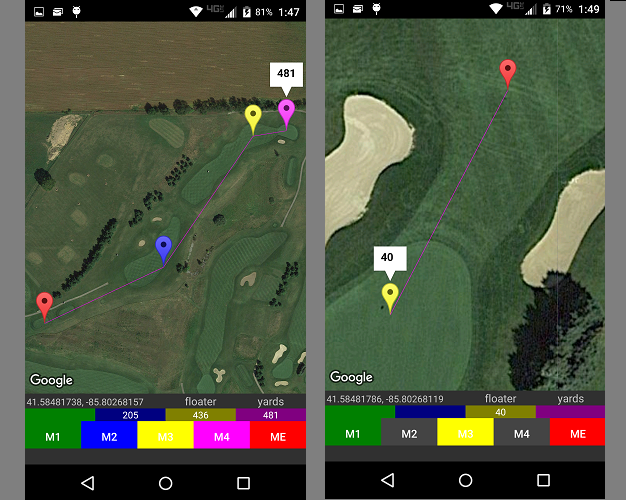
- Press any marker and the distance to the previous marker will be shown
- Press any markers info window and zoom in at level 1
- If ME is not set then pressing ME will move ME marker to the current location
- If ME marker is set press ME to zoom in at level 1
- Press ME again to zoom in at level 2
- Press ME again to zoom back to level 1
- The distance from the ME marker to each marker will be shown in the status bar according to color
- If Follow ME is on then pressing the current location on the status bar will make the camera track the ME marker. Press it again and turn tracking off
- Press M1-M4 to select then click on screen to place marker
- Press M1-M4 to select then click on the marker of the same color to remove marker
- Press & Hold M1-M4 to drop or move a marker to the current location. The marker will automatically be saved if a course is selected
- Press & Hold anywhere on the map where there is no marker to zoom to all markers
- Press any marker and the distance to the previous marker will be shown
- Press any markers info window and zoom in at level 1
- If ME is not set then pressing ME will move ME marker to the current location
- If ME marker is set press ME to zoom in at level 1
- Press ME again to zoom in at level 2
- Press ME again to zoom back to level 1
- The distance from the ME marker to each marker will be shown in the status bar according to color
- If Follow ME is on then pressing the current location on the status bar will make the camera track the ME marker. Press it again and turn tracking off